Introduction : The Constant Hum of the Attention Economy
In our hyper-connected 2026 reality, smartphones are no longer mere communication tools; they have evolved into portable slot machines engineered to capture and monetize every second of our attention. Whether you are in New York, London, Toronto, or Sydney, waking up in the morning instantly triggers a barrage of red notification badges, breaking news alerts, flashy app banners, and social media pings.
For many modern professionals, this relentless influx creates a low-grade, chronic state of mental exhaustion often called "Digital Fatigue." We try to fix it by silencing our phones for a few minutes or adopting drastic, unsustainable cold-turkey measures—like tossing our phones into a drawer—only to relapse within days.
True digital peace, however, is not achieved by abandoning technology entirely. It is mastered through Digital Minimalism—a deliberate philosophy of reshaping our relationship with devices so that technology serves our intentional goals rather than hijacking our time. And the most powerful tool to achieve this sits quietly inside your pocket right now: Android’s native Digital Wellbeing suite.
[Author's Perspective : Embracing Intentional Tech Usage]
As someone who reviews and optimizes digital workflows daily, I used to believe that productivity meant staying plugged into every stream of information 24/7. But over time, the constant digital noise began taking a severe toll on deep focus and mental clarity. Embracing digital minimalism didn’t mean throwing away my Android device; it meant setting strict, unyielding boundaries. By utilizing built-in tools like App Timers and Focus Mode, I stopped reacting to every ad-driven ping and reclaimed hours of uninterrupted mental space every single week.
1. The Hidden Psychological Toll of Notification Fatigue

Before configuring your device, it is crucial to understand why constant digital interruptions drain us so deeply:
- The Attention Residue Effect : According to landmark research by Professor Gloria Mark at the University of California, Irvine (UC Irvine), every time a notification buzzes and you glance at your screen, your brain leaves behind an invisible "attention residue." Re-focusing on your actual deep-work task takes an average of 23 minutes and 15 seconds.
- Ad-Driven Dopamine Loops : Modern mobile apps are structurally designed to trigger continuous micro-dopamine hits through endless scrolling, algorithmic feeds, and timed push notifications, turning intentional users into passive ad consumers.
- Fragmented Rest : Even during downtime or family hours, unmanaged background alerts keep the nervous system in a low-level "fight-or-flight" response, preventing true cognitive recovery.
2. The Philosophy of Digital Minimalism : Quality Over Connectivity
Digital minimalism is not about becoming a tech-phobic hermit. As digital pioneer Cal Newport famously advocates, it is about ruthlessly culling the trivial tech clutter so you can invest your time heavily in the things that truly bring value.
On Android, applying this philosophy means shifting from reactive consumption (opening your phone because it buzzed) to proactive intentionality (opening your phone only when you decide to). Instead of relying on willpower—which inevitably fails against billion-dollar app engineering—we can automate our boundaries using the operating system itself.
3. Actionable Guide : Mastering Android Digital Wellbeing Tools
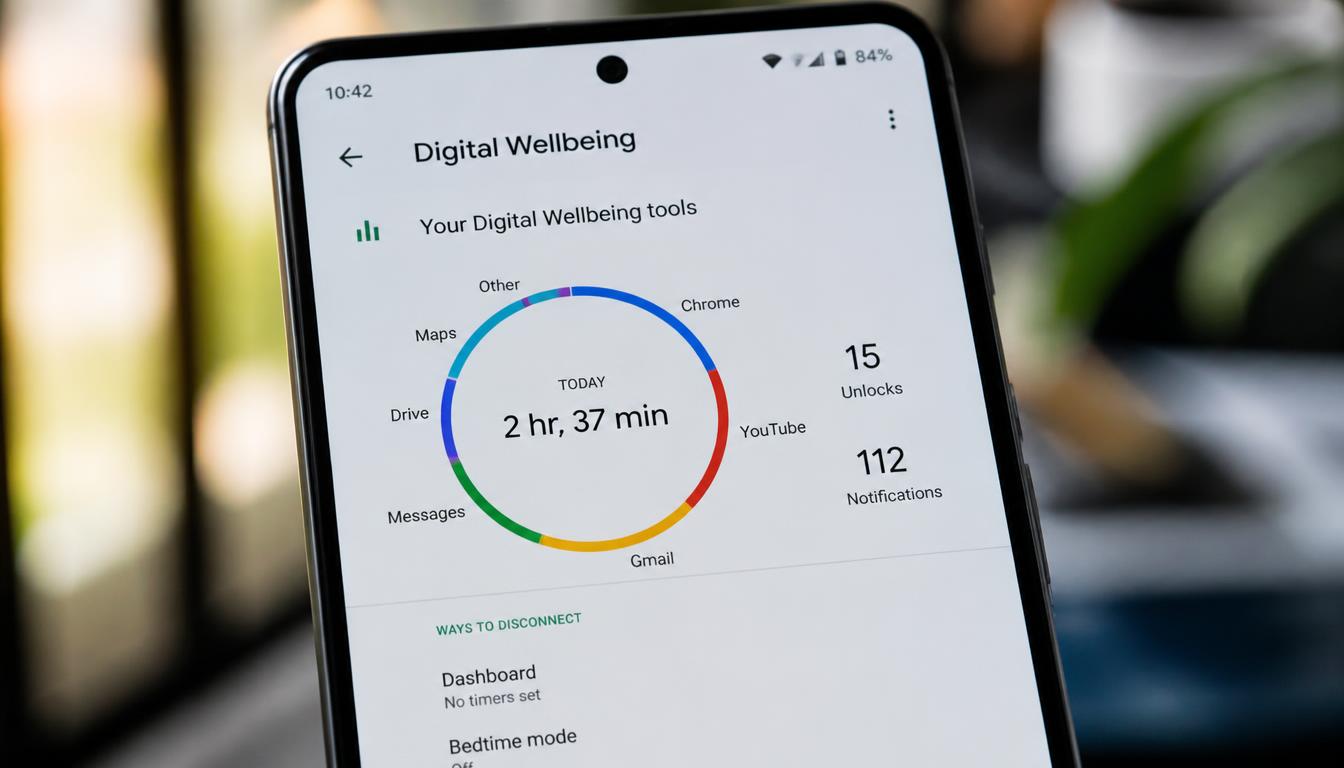
To put digital minimalism into practice, let’s configure the core native features built directly into Android devices (such as Google Pixel, Samsung Galaxy, and other ecosystem flagships):
- Step 1 : Audit Your Digital Dashboard:
- Open your phone's Settings and tap Digital Wellbeing & Parental Controls.
- Look at your daily unlock count and top notification-heavy apps. Confronting these raw metrics is the crucial first step toward intentional control.
- Step 2 : Deploy App Timers (Ending Doomscrolling):
- Tap on your dashboard's app list and set strict daily time limits for high-distraction apps (e.g., capping social media or news feeds at 30 minutes per day).
- Once the timer expires, Android automatically grays out the app icon and blocks access until midnight, eliminating the mindless rabbit hole of infinite scrolling.
- Step 3 : Program Focus Mode (Silencing Distractions on Demand):
- Navigate to Focus Mode within Digital Wellbeing. Select your most distracting work-hour applications (like messaging apps or shopping platforms).
- Set a schedule (e.g., Monday through Friday, 9:00 AM to 5:00 PM) or toggle it manually. Focus Mode pauses these apps, silences their notifications, and prevents them from breaking your concentration when you need deep work.
- Step 4 : Automate Bedtime Mode (Protecting Sleep Hygiene):
- Configure Bedtime Mode to turn your screen into grayscale (monochrome) 30 minutes before your scheduled sleep time. Stripping away vibrant app colors drastically reduces the psychological pull of your screen, signaling to your brain that it's time to wind down.
4. Why Native Android Tools Trump Third-Party "Focus" Apps

When looking for ways to cut down screen time, many users search the Google Play Store for third-party "app blocker" or "lockscreen" utilities. However, from a security and performance standpoint, native Digital Wellbeing features are vastly superior:
- Zero Performance Overhead : Third-party blockers often run heavy background monitoring services, draining your battery and slowing down your system. Android’s native tools are baked directly into the OS kernel.
- Un-bypassable System Integration : Independent blocker apps can often be uninstalled or force-stopped when a user experiences a craving. Native Digital Wellbeing settings can be locked with a PIN or managed via family link controls, preventing impulsive workarounds.
- Absolute Privacy : Third-party blocking apps frequently request sweeping accessibility permissions, potentially harvesting your app usage habits. Google's native system processes your data locally under strict privacy standards.
5. Pro-Level Digital Minimalism : Advanced Tactics for Android Power Users
Beyond basic app timers and default focus modes, long-term digital minimalists often employ clever interface tweaks to break unconscious smartphone habits. If you want to take your digital hygiene to the next level without relying on risky third-party blockers, consider these three advanced, community-tested tactics:
① The Triple-Click Grayscale Shortcut (Visual Dopamine Kill Switch)
While switching your entire phone to monochrome (grayscale) is one of the most effective ways to kill the addictive pull of bright, colorful app icons and short-form videos, constantly digging through system settings to turn it on and off for maps or photography is frustrating. The fix? Configure Android’s Accessibility Shortcut. By mapping grayscale mode to a quick triple-press of your power button or a back-tap gesture, you can instantly plunge your screen into a dull monochrome state and bring back full color just as fast. This eliminates the operational friction of managing color while starving your brain of continuous color-based dopamine loops.
② Friction Engineering: The Intentional Logout Protocol
Willpower alone is rarely enough to stop mindless doomscrolling; eventually, your brain overrides your intentions. Instead of fighting your impulses with pure willpower, introduce structural friction. For high-temptation apps (like social media or shopping platforms), make it a strict rule to manually log out every single time you finish a session. The next time you want to mindlessly check your feed, you will be forced to type out your entire email and password. That 30-second administrative hurdle gives your brain enough time to ask: "Do I actually need to open this right now?"—stopping the vast majority of impulsive app openings.
③ The Notification Digest Protocol (Beating FOMO)
The biggest reason people fail to silence their mobile notifications is the deep-seated anxiety of missing something important—known as FOMO (Fear of Missing Out). Instead of turning off all alerts blindly and panicking, use Android's advanced notification channel controls. Group non-urgent apps into a delayed notification category, allowing marketing updates and social pings to arrive in bulk only twice a day during scheduled breaks. This completely eliminates the physiological distraction of real-time buzzing while ensuring you never miss a genuinely critical update.
Conclusion : Reclaiming Your Time and Attention

Living a digitally minimalist life in 2026 doesn't require living off the grid. It simply requires taking back the remote control of your daily attention. By transitioning from passive device consumption to intentional management using Android's native Digital Wellbeing suite, you can effectively silence notification fatigue, block invasive advertising distractions, and protect your most valuable finite resource: your focus.
[Personal Reflection: Learning the Hard Way]"If we're being completely honest, many of us have fallen into the trap of downloading random third-party productivity apps or indie AI wrappers just out of casual curiosity—only to watch our smartphones start lagging, batteries drain abnormally fast, or worse, get bombarded with an annoying flood of spam texts and sketchy notifications. If you browse tech forums or online communities, these security horror stories are everywhere, and I’ll admit: I’ve learned this lesson the hard way from my own past mistakes.
That’s exactly why making the switch to official, native browser and system tools matters so much. By taking the insights we've covered today and sticking to secure, built-in solutions, you can cut through information overload without risking your digital peace of mind. Here’s to enjoying a much safer, smarter mobile life on the go!"
[Disclaimer]
This content is provided for informational purposes only and does not constitute technical, medical, or legal advice. All smartphone configuration and privacy choices are at the sole discretion of the reader.