Are your beautifully crafted blog posts lost in the Google Sandbox, receiving zero traffic? Discover the exact method to bypass the waiting game and manually force Googlebot to crawl and index your new URLs using Google Search Console.
1. The Agony of the Google Sandbox and Crawl Delays
Every new blogger experiences the same frustration: you spend hours researching, writing, and formatting a perfect article, hit 'Publish', and then... crickets. You search for your exact title on Google, and your post is nowhere to be found.
This happens because Googlebot (the software Google uses to discover new content) prioritizes older, high-traffic websites. For a newly launched blog, it can take days or even weeks for Googlebot to naturally discover your new link. Fortunately, you don't have to wait passively. You can use Google Search Console (GSC) to manually notify Google that your new content is ready for the world.
2. What is Manual Indexing (URL Inspection)?
Manual indexing is a feature within Google Search Console that allows webmasters to submit individual URLs directly to Google's priority crawl queue.
- Faster Visibility: Instead of waiting weeks for organic discovery, your page can appear in search results within a few hours or a couple of days.
- Error Checking: It immediately tells you if your page has any mobile usability issues or technical errors preventing it from being indexed.
- Safe and Recommended: Doing this for every new post is perfectly safe and highly recommended for new websites trying to build early traffic.
3. Step-by-Step: How to Request Indexing in GSC
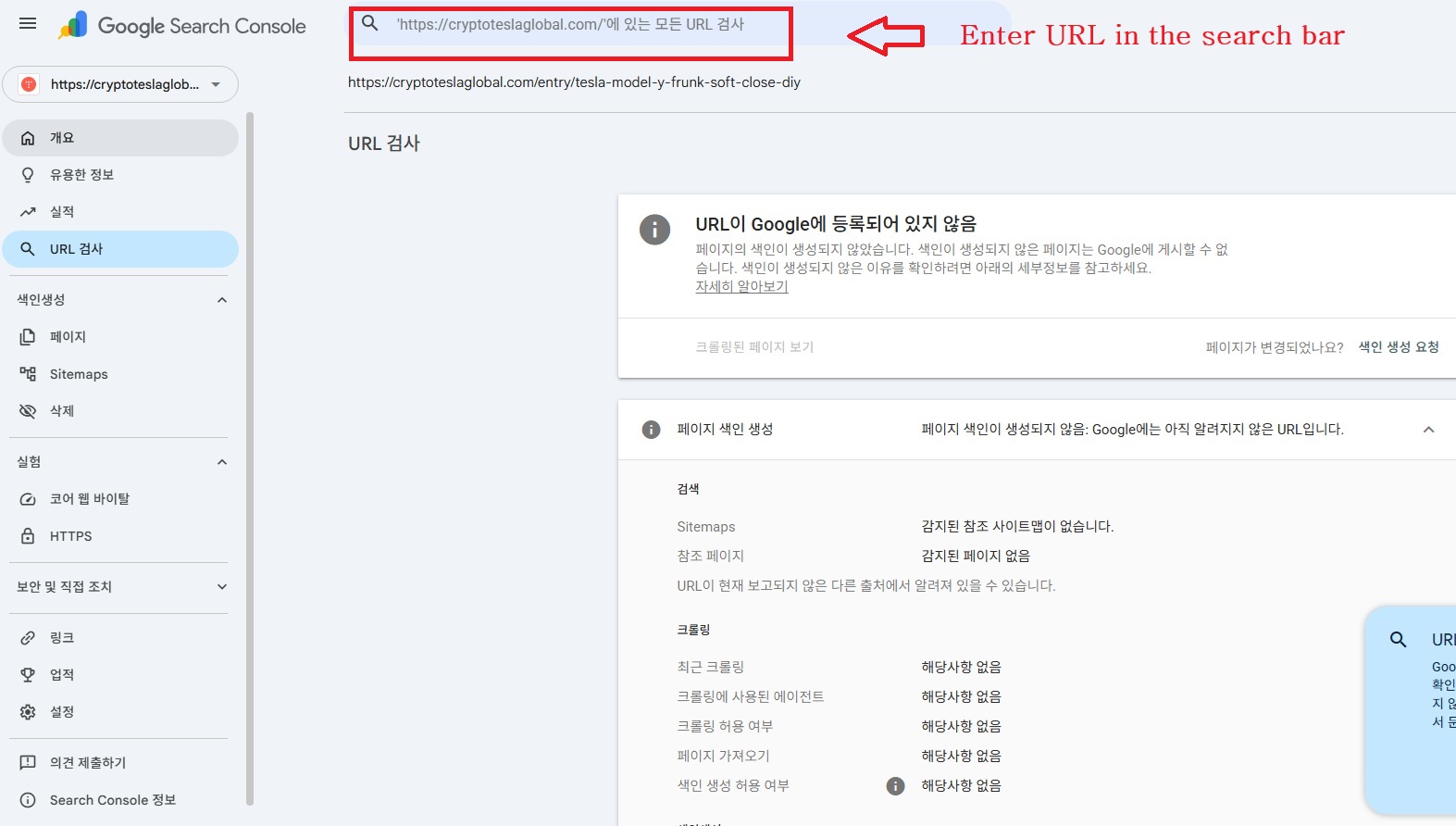
Follow these simple steps every time you publish a new article:
- Access Search Console: Log in to your Google Search Console account and select your website's property from the top-left dropdown menu.
- Use the Inspection Tool: Click on [URL Inspection] on the left-hand sidebar, or simply click the large search bar located at the very top of the dashboard.
- Paste Your URL: Copy the exact link of your newly published blog post and paste it into the search bar, then hit Enter.
- Review the Status: Google will fetch the data. If it's a brand new post, you will see a gray message stating: "URL is not on Google." This simply means it hasn't been crawled yet.
- Click 'Request Indexing': Look for the button that says [Request Indexing] and click it.
- Wait for Confirmation: Google will take a minute or two to test the live URL. Once finished, a pop-up will confirm that the "Indexing requested" successfully.
4. Important Rules and Best Practices
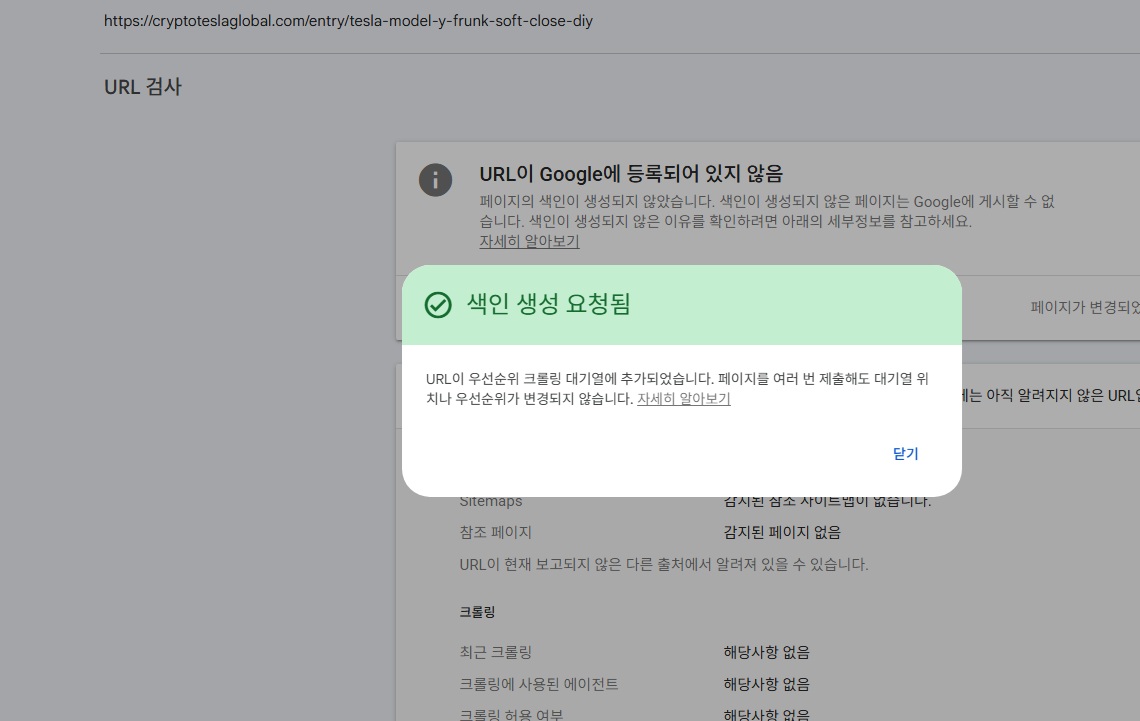
- Alt Text: A confirmation pop-up in Google Search Console stating that URL indexing has been requested.
- Caption: Once requested, your URL is added to a priority queue for Google to crawl.
While this tool is incredibly powerful, there are a few rules to keep in mind:
- Do not spam the button: Pressing "Request Indexing" multiple times for the same URL will not make it index faster. Once is enough.
- Daily Quotas: Google imposes a daily limit on manual indexing requests to prevent abuse (usually around 10 to 50 URLs per day, depending on the site's authority). This is more than enough for regular daily publishing.
- Content Quality Matters: Requesting indexing only brings the Googlebot to your page. If the content is low-quality, duplicated, or lacking value, Google may still choose not to index it even after crawling.
5. Conclusion: Build a Bulletproof Publishing Habit
Mastering Google Search Console is the first major step toward escaping the sandbox. By incorporating this simple 2-minute manual indexing routine into your publishing workflow, you ensure that your hard work reaches the search engine results pages (SERPs) as quickly as possible. Stop waiting for Google to find you, and start leading them directly to your content!
"I wrote this post with the hope that it serves as a smart, efficient guide for beginner bloggers who are just taking their first steps and sharing their stories. I’m right there with you, diligently building my own digital pipeline from the same starting line. As my experience accumulates and bears fruit, I promise to keep bringing you even more practical and valuable content."
[Deep Dive & Insights]
"Curious about the next wave of AI breakthroughs, biotech innovations, and advanced science—and how to translate those shifts into a winning investment mindset? Don't just watch the future unfold. Dive into my exclusive archive of in-depth analyses and discover where the smart money is heading next."
The AI Wealth Multiplier: How the Artificial Intelligence Boom Created a Record 3,302 Billionaires in 2026
The gap between traditional income and asset growth has never been wider. According to the latest 2026 Global Wealth Report by Swiss bank UBS, the artificial intelligence revolution is fueling a historic wealth transfer, pushing the global billionaire popu
cryptoteslaglobal.com
The Hidden Cost of AI: When Algorithms Drain Our Reservoirs and Power Grids
The Hidden Cost of AI: When Algorithms Drain Our Reservoirs and Power Grids
The Paradigm Shift in AI Anxiety For the past few years, the collective anxiety surrounding Artificial Intelligence has been largely confined to the digital and economic realms. We worried about deepfakes manipulating elections, algorithms plagiarizing art
cryptoteslaglobal.com
The Hidden Cost of the $11T AI Boom: Debt, Baffling Bills, and the Inevitable Rise in Service Fees
The Hidden Cost of the $11T AI Boom: Debt, Baffling Bills, and the Inevitable Rise in Service Fees
We are witnessing an unprecedented $11 trillion investment in AI compute power. But behind the glitz of GPU clusters and massive data centers, a shadow is growing: a $7 trillion debt market that Wall Street may be forced to absorb. Are we looking at a sust
cryptoteslaglobal.com